#0 OmniKeePass
└─ Making KeePassXC to work with both WSL and Windows envs
@ 2024.01.09 | keepass, linux, shell, ssh, wsl

Greetings!
A rather strange first post for my blog, but I have to start somewhere. Sorry in advance for any language mistakes.
But first, a short preface. Please, don't be that person who doesn't care about personal data on the Internet. Use local/self-hosted password managers (not the cloud ones), generate different and strong passwords, use 2FA and make backups. These words are based on my personal expirience; I used to be the person who doesn't care, but as I grew up, I realized how vulnerable we are on the Internet, and after several data leaks and hacking attempts, I started using all kinds of safe solutions. Don't be indifferent to your data, otherwise you may regret it.
So, let's get to the topic.
For a long time I used KeePass with KeeAgent plugin for forwarding SSH keys from the database to an SSH agent, and it was awesome. What I liked about this combo:
If the database is closed and you are trying to connect via SSH, KeeAgent calls KeePass to open a database for unlocking, and after unlocking the keys will be added to KeeAgent;
KeeAgent stores credentials in a non-persist way.
Recently I decided to move to KeePassXC as it has better browser integration and a nicer interface. Since it relies on external agents (Windows OpenSSH or Pageant), things I liked don't work here. I'm used to this, I'll try to replicate the functionality!
First I started looking for a suitable agent, as supported agents have issues:
Windows OpenSSH stores keys in Windows Registry. For example, if you hard reset a computer keys will remain in the registry (sounds insecure, huh?). Using startup scripts for clearing the agent isn't the way. Also, there's a fork of Windows OpenSSH that stores credentials in a non-persist way, but I wanna rely on the upstream version.
Recent versions of Pageant can integrate with Windows OpenSSH. Unfortunately, the named pipe path changes each reboot. The issue can be solved with bash/pwsh magic, but I'm trying to make as few dirty hacks as possible (it will sound more ironic when you continue reading that article).
I continued my search for the agent that suits my needs. I found OmniSSHAgent, and it turned out that this is the best solution. It stores keys in a non-persist way and supports all communication interfaces:

Isn't this a dream?
To use the named pipe from Windows in WSL2 I could use socat utility, but I decided to use wsl2-ssh-agent, which makes a communication bridge between Windows and WSL2 with PowerShell.

Alright, I need to place these utilities somewhere. I thought: what if I put configs and utilities in Windows' %USERPROFILE%/.ssh and just link that path to WSL2's ~/.ssh to have the same config for both environments? Without additional WSL2 tuning, it will not work. The problem is that Windows files inside WSL2 don't store Linux permissions by default, so most Windows files will have all rwx bits, and this will cause SSH clients to throw permission errors. To fix that, I edited /etc/wsl.conf:
[automount]
options = "metadata"
Before linking directories, I moved %USERPROFILE%\.ssh to %USERPROFILE%\.ssh.bak, created %USERPROFILE%\.ssh, also moved ~/.ssh to ~/.ssh.bak. After that ran this command:
ln -sTv /mnt/c/Users/$(pwsh.exe -c '$env:USERNAME' | tr -d '\r')/.ssh $HOME/.ssh
Downloaded utilities were placed in ~/.ssh/bin. I added Include aliases/* in ~/.ssh/config to separate aliases between files. It's very handy thing for me. For example, ~/.ssh/aliases/git contains aliases for different repo-based platforms:
Host github
  Hostname github.com
  User git

Host gitlab
  Hostname gitlab.com
  User git
Then I wrote fix-perms.sh for fixing file permissions (mostly needed to run once after linking directories) and placed it in ~/.ssh/bin:
#!/usr/bin/env bash
cd $HOME/.ssh
chmod 600 authorized_keys config known_hosts* aliases/*
chmod 700 bin/*
At this moment I have the next file structure:
~/.ssh
├── authorized_keys
├── bin
│   ├── init.sh
│   ├── middleware.ps1
│   ├── omni-ssh-agent.exe
│   └── wsl2-ssh-agent
├── config
├── hosts
│   ├── git
│   ├── home
│   └── work
├── known_hosts
└── sockets
    ├── cygwin.socket
    ├── unix.socket
    └── wsl.sock
Appended the following command to ~/.bashrc:
eval $($HOME/.ssh/bin/wsl2-ssh-agent -socket /tmp/wsl.sock)
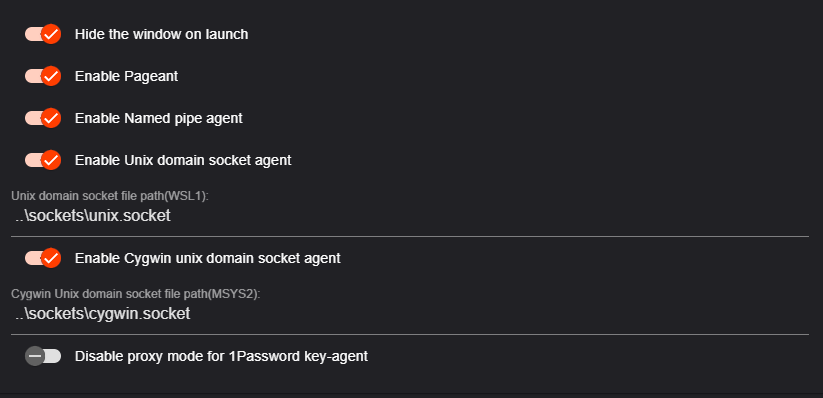
Enabled these options in OmniSSHAgent's settings:
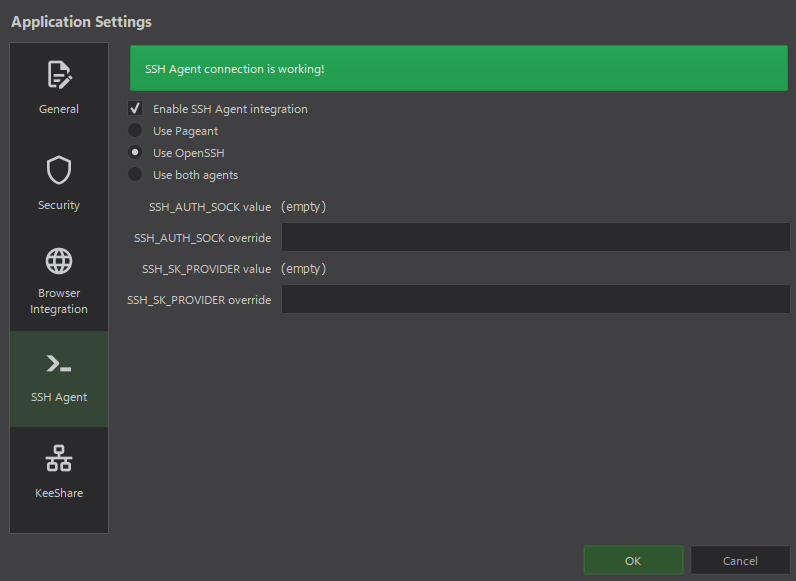
Made sure that KeePassXC is correctly configured for integration with the agent:
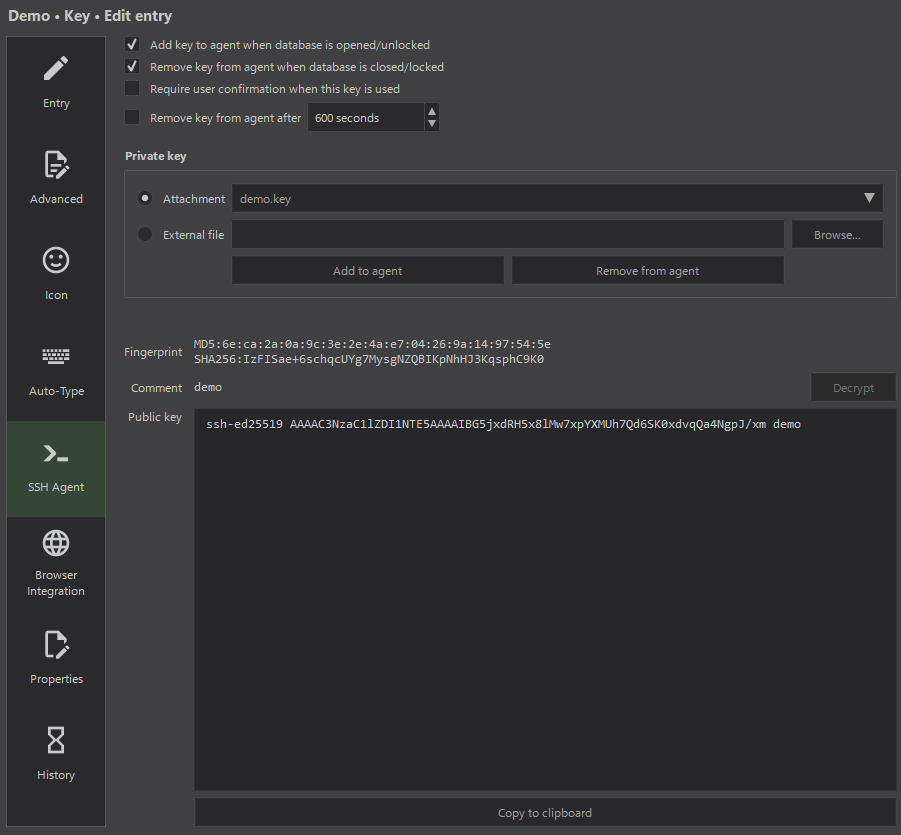
And entries with a key are configured for adding to the agent:
Amazing, I got almost everything I need and configured all utilities. At this moment, the named pipe will be accessible by any program that supports it from both environments.
So, how can I replicate the behavior of KeeAgent when the database is locked?
At first, I decided to write a script that would replicate the behavior of KeeAgent. Remember what I said about the irony? This is it:
#!/usr/bin/env -S pwsh.exe

$Database = "B:\Cloud\Secrets.kdbx"

$Agent = Get-ChildItem "$PSScriptRoot\omni-ssh-agent.exe"
$Keepass = Get-ChildItem "B:\Programs\KeePassXC\KeePassXC.exe"

$KeepassWidth = 1280
$KeepassHeight = 720
$KeepassFocused = $False
$AgentHasNoKeys = $False

Add-Type -AssemblyName System.Windows.Forms

Add-Type @"
    using System;
    using System.Runtime.InteropServices;
    public class WinAPI {
        [DllImport("user32.dll")]
        public static extern bool MoveWindow(IntPtr hWnd, int X, int Y, int nWidth, int nHeight, bool bRepaint);
        [DllImport("user32.dll")]
        public static extern IntPtr GetForegroundWindow();
        [DllImport("user32.dll")]
        [return: MarshalAs(UnmanagedType.Bool)]
        public static extern bool IsIconic(IntPtr hWnd);
    }
"@

Function Agent-Start {
    Start-Process -PassThru $Agent | Out-Null
    Start-Sleep 0.5
}

Function Agent-Status {
	$Output = (C:\Windows\System32\OpenSSH\ssh-add -l 2>&1 | Out-Null)
	Return $LastExitCode
}

Function Agent-Isnt-Running {
    Return -Not (Get-Process -ErrorAction SilentlyContinue $Agent.BaseName | Select -Expand ProcessName)
}

Function Keepass-Start {
    Param([String[]]$ArgumentList = $Database, [Int]$Width = $KeepassWidth, [Int]$Height = $KeepassHeight)
    Start-Process -PassThru $Keepass -ArgumentList $ArgumentList | Out-Null
    Start-Sleep 0.1
    $Process = Get-Process -Name $Keepass.BaseName -ErrorAction SilentlyContinue | Select-Object -First 1
    If (-Not $Process) { Return $False }
    $Handle = $Process.MainWindowHandle
    If ($Handle -eq 0) { Return $False }
    $ScreenWidth = [System.Windows.Forms.Screen]::PrimaryScreen.WorkingArea.Width
    $ScreenHeight = [System.Windows.Forms.Screen]::PrimaryScreen.WorkingArea.Height
    $X = [Math]::Max(0, ($ScreenWidth - $Width) / 2)
    $Y = [Math]::Max(0, ($ScreenHeight - $Height) / 2)
    [WinAPI]::MoveWindow($Handle, [Int]$X, [Int]$Y, $Width, $Height, $True)
}

Function Keepass-Status {
    If ($KeepassFocused) { Return $False }
    $Title = Get-Process -Name $Keepass.BaseName | ForEach-Object { $_.MainWindowTitle }
    $Status = !$Title.Contains("[Locked]") -And $Title.Contains("- KeePassXC")
    If ($Status) {
        $AgentHasNoKeys = $True
        Return $True
    } Else {
        Return $False
    }
}

Function Keepass-Isnt-Running {
    Return -Not (Get-Process -ErrorAction SilentlyContinue $Keepass.BaseName | Select -Expand ProcessName)
}

Function Keepass-Isnt-Active {
    If ($KeepassFocused) { Return $False }
    $Window = [WinAPI]::GetForegroundWindow()
    $Process = Get-Process -ErrorAction SilentlyContinue -Name $Keepass.BaseName
    If ($Process -and $Process.MainWindowHandle -ne 0) {
        $IsMinimized = [WinAPI]::IsIconic($Process.MainWindowHandle)
        $IsNotActive = $Process.MainWindowHandle -ne $Window
        $KeepassFocused = $True
        Return ($IsMinimized -or $IsNotActive)
    } Else {
        $KeepassFocused = $True
        Return $True
    }
}

While ($Status = Agent-Status) {
    Switch ($Status) {
        2 {
            If (Agent-Isnt-Running) {
                $KeepassFocused = $True
                Agent-Start
                Start-Sleep 0.5
                Keepass-Start -ArgumentList --lock
            }
        }
        1 {
            If (Keepass-Isnt-Running) {
                Keepass-Start
            }
            If (Keepass-Status) {
                $KeepassFocused = $True
                $AgentHasNoKeys = $True
                Keepass-Start -ArgumentList --lock
            }
            If (Keepass-Isnt-Active) {
                $KeepassFocused = $True
                Keepass-Start
            }
        }
        0 {
            Exit 0
        }
    }
	Start-Sleep 0.5
}
I placed that script in ~/.ssh/bin/wrapper.ps1. Logic explanation using pseudocode:
while omnisshagent is empty:
  if omnisshagent is not running:
    startomnisshagent
  if keepassxc is not running:
    start keepassxc
  if keepassxc is minimized to tray:
    unminize keepassxc
Should be easy to understand. Of course, I made sure that a million copies of programs will not spawn in that loop.
Now I must realize how to run that script before an SSH connection. A wrapper for /usr/bin/ssh in /usr/local/bin/ssh? Meh. It will only work in WSL2 by running ssh. I need something to make the wrapper run anytime an SSH connection starts. It makes sense to set this up somewhere in the SSH config. ProxyCommand? Ok, let's try:
Host *
  ProxyCommand "pwsh.exe -c c:/users/%u/.ssh/wrapper.ps1"
The command above was selected so that it runs equally well from both environments.
To use that option properly, nc must be called at the end of wrapper.ps1 with specific arguments to create a TCP connection between the client and the server. I rewrote the wrapper a little to be able to get arguments from the SSH config. The config now:
Host *
  ProxyCommand "pwsh.exe -c c:/users/%u/.ssh/wrapper.ps1 %h %p"
Where %h is the hostname of the target alias, and %p is the port of the target alias.
Sadly, connections end up with a bad length error when I call Windows programs from wrapper.ps1. I haven't figured out what the problem is. I think Windows programs create unwanted output that passes in stdin of the server then an error occurs. I tried to call programs with output redirection, tried it via shell script, tried nc for Windows and Linux, feels like I tried everything — no luck, skill issue for sure…
…then Match walks into the bar:
Match Host * exec "pwsh.exe -c c:/users/%u/.ssh/wrapper.ps1"
Yes, RTFM moment. Yes, it just runs the command before the connection. Yes, no more dirty hacking in between.
The final file structure:
~/.ssh
├── aliases
│   └── git
├── bin
│   ├── fix-perms.sh
│   ├── omni-ssh-agent.exe
│   ├── wrapper.ps1
│   └── wsl2-ssh-agent
└── config
And the SSH config:
Include aliases/*
Match Host * exec "pwsh.exe -c c:/users/%u/.ssh/bin/wrapper.ps1"
Additionaly I added a handler to connect to aliases via ssh:// handler. It can be called from KeePassXC, Windows Run, a web browser, etc. Source code of the handler:
Windows Registry Editor Version 5.00

[HKEY_CLASSES_ROOT\ssh]
@="URL:Windows OpenSSH Handler"
"URL Protocol"=""

[HKEY_CLASSES_ROOT\ssh\shell]
[HKEY_CLASSES_ROOT\ssh\shell\open]
[HKEY_CLASSES_ROOT\ssh\shell\open\command]
@="pwsh -wd ~ -c ssh %1"
The last line can be replaced with the following option to connect to the alias from WSL2 or by creating a separate handler with a different name:
@="bash -c 'eval $($HOME/.ssh/wsl2-ssh-agent -socket /tmp/wsl2.sock) ssh %1'"
And finally I got what I wanted: