---
title: OmniKeePass
description: Making KeePassXC to work with both WSL and Windows envs
date: 2024.01.09 12:12:12 UTC+5
categories:
- linux
- wsl
- keepass
- ssh
- shell
---

Greetings!
A rather strange first post for my blog, but I have to start somewhere. Sorry in advance for any language mistakes.
But first, a short preface.
Please, don't be that person who doesn't care about personal data on the Internet.
Use local/self-hosted password managers (not [the cloud ones](https://blog.lastpass.com/2022/12/notice-of-recent-security-incident/)), generate different and strong passwords, use 2FA and make backups.
These words are based on my personal expirience; I used to be the person who doesn't care, but as I grew up, I realized how vulnerable we are on the Internet, and after several data leaks and hacking attempts, I started using all kinds of safe solutions.
Don't be indifferent to your data, otherwise you may regret it.
So, let's get to the topic.
For a long time I used [KeePass](https://keepass.info/) with [KeeAgent](https://lechnology.com/software/keeagent/) plugin for forwarding SSH keys from the database to an SSH agent, and it was awesome.
What I liked about this combo:
- If the database is closed and you are trying to connect via SSH, [KeeAgent](https://lechnology.com/software/keeagent/) calls [KeePass](https://keepass.info/) to open a database for unlocking, and after unlocking the keys will be added to [KeeAgent](https://lechnology.com/software/keeagent/);
- [KeeAgent](https://lechnology.com/software/keeagent/) stores credentials in a non-persist way.
Recently I decided to move to [KeePassXC](https://keepassxc.org/) as it has better browser integration and a nicer interface. Since it relies on external agents ([Windows OpenSSH](https://github.com/PowerShell/Win32-OpenSSH) or [Pageant](https://www.chiark.greenend.org.uk/~sgtatham/putty/)), things I liked don't work here. I'm used to this, I'll try to replicate the functionality!
First I started looking for a suitable agent, as supported agents have issues:
- [Windows OpenSSH stores keys in Windows Registry](https://github.com/PowerShell/Win32-OpenSSH/issues/1487). For example, if you hard reset a computer keys will remain in the registry (sounds insecure, huh?). Using startup scripts for clearing the agent isn't the way. Also, there's [a fork of Windows OpenSSH](https://github.com/HiFiPhile/openssh-cleaned) that stores credentials in a non-persist way, but I wanna rely on the upstream version.
- Recent versions of [Pageant can integrate with Windows OpenSSH](https://the.earth.li/%7Esgtatham/putty/0.78/htmldoc/Chapter9.html#pageant-cmdline-openssh). Unfortunately, the named pipe path changes each reboot. The issue can be solved with bash/pwsh magic, but I'm trying to make as few dirty hacks as possible (it will sound more ironic when you continue reading that article).
I continued my search for the agent that suits my needs. I found [OmniSSHAgent](https://github.com/masahide/OmniSSHAgent), and it turned out that this is the best solution. It stores keys in a non-persist way and supports all communication interfaces:

Isn't this a dream?
To use the named pipe from Windows in [WSL2](https://learn.microsoft.com/en-us/windows/wsl/about) I could use [socat](http://www.dest-unreach.org/socat/) utility, but I decided to use [wsl2-ssh-agent](https://github.com/mame/wsl2-ssh-agent), which [makes a communication bridge between Windows and WSL2 with PowerShell](https://github.com/mame/wsl2-ssh-agent#how-wsl2-ssh-agent-works).

Alright, I need to place these utilities somewhere.
I thought: what if I put configs and utilities in Windows' %USERPROFILE%/.ssh and just link that path to [WSL2](https://learn.microsoft.com/en-us/windows/wsl/about)'s ~/.ssh to have the same config for both environments?
Without [additional WSL2 tuning](https://learn.microsoft.com/en-us/windows/wsl/wsl-config#automount-options), it will not work.
The problem is that Windows files inside [WSL2](https://learn.microsoft.com/en-us/windows/wsl/about) don't store Linux permissions by default, so most Windows files will have all [rwx](https://en.wikipedia.org/wiki/File-system_permissions#Numeric_notation) bits, and this will cause SSH clients to throw permission errors. To fix that, I edited /etc/wsl.conf:
```ini
[automount]
options = "metadata"
```
Before linking directories, I moved %USERPROFILE%\\.ssh to %USERPROFILE%\\.ssh.bak, created %USERPROFILE%\\.ssh, also moved \~/.ssh to \~/.ssh.bak.
After that ran this command:
```bash
ln -sTv /mnt/c/Users/$(pwsh.exe -c '$env:USERNAME' | tr -d '\r')/.ssh $HOME/.ssh
```
Downloaded utilities were placed in \~/.ssh/bin.
I added Include aliases/* in \~/.ssh/config to separate aliases between files.
It's very handy thing for me.
For example, ~/.ssh/aliases/git contains aliases for different repo-based platforms:
```yaml
Host github
Hostname github.com
User git
Host gitlab
Hostname gitlab.com
User git
```
Then I wrote [fix-perms.sh](./data/ssh/bin/fix-perms.sh) for fixing file permissions (mostly needed to run once after linking directories) and placed it in ~/.ssh/bin:
```sh
#!/usr/bin/env bash
cd $HOME/.ssh
chmod 600 authorized_keys config known_hosts* aliases/*
chmod 700 bin/*
```
At this moment I have the next file structure:
```plaintext
~/.ssh
├── authorized_keys
├── bin
│ ├── init.sh
│ ├── middleware.ps1
│ ├── omni-ssh-agent.exe
│ └── wsl2-ssh-agent
├── config
├── hosts
│ ├── git
│ ├── home
│ └── work
├── known_hosts
└── sockets
├── cygwin.socket
├── unix.socket
└── wsl.sock
```
Appended the following command to ~/.bashrc:
```bash
eval $($HOME/.ssh/bin/wsl2-ssh-agent -socket /tmp/wsl.sock)
```
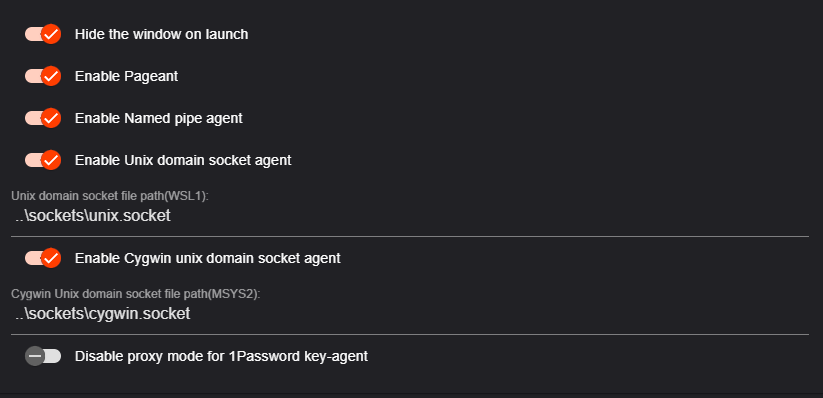
Enabled these options in [OmniSSHAgent](https://github.com/masahide/OmniSSHAgent)'s settings:
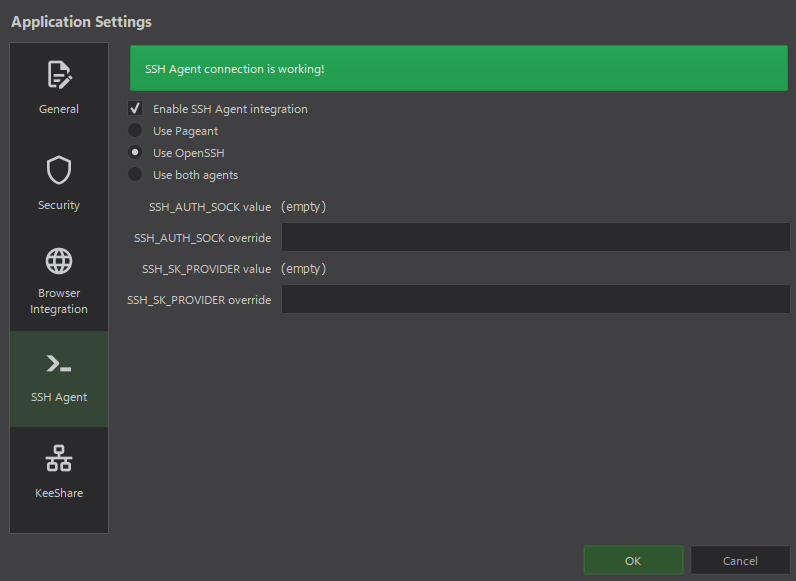
Made sure that [KeePassXC](https://keepassxc.org/) is correctly configured for integration with the agent:
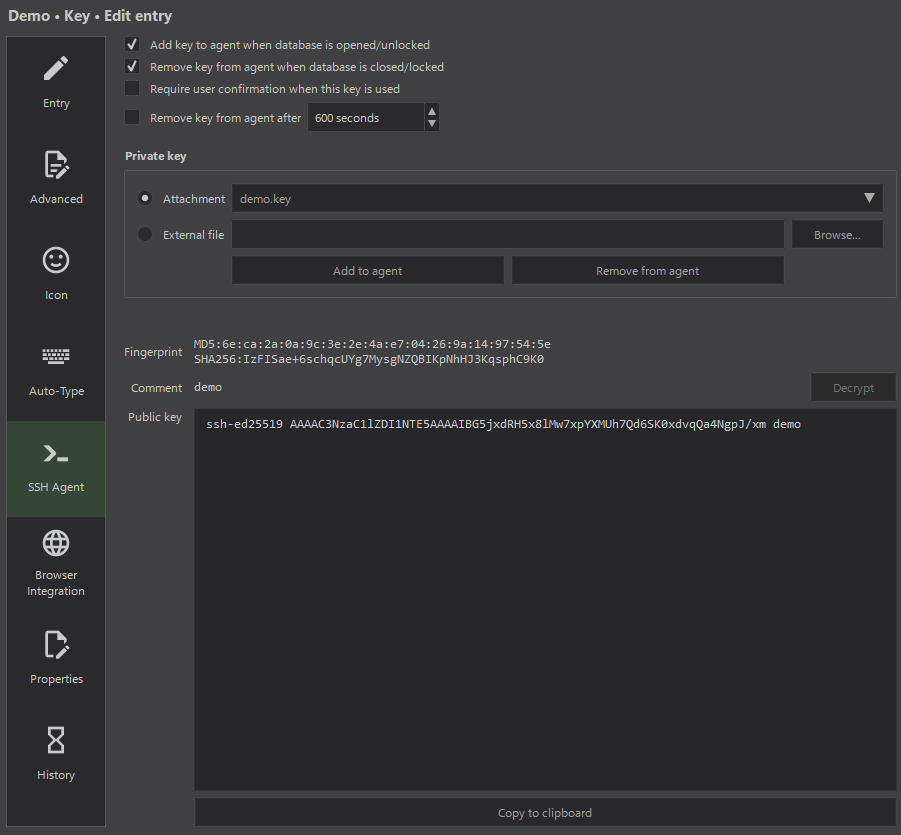
And entries with a key are configured for adding to the agent:
Amazing, I got almost everything I need and configured all utilities.
At this moment, the named pipe will be accessible by any program that supports it from both environments.
So, how can I replicate the behavior of [KeeAgent](https://lechnology.com/software/keeagent/) when the database is locked?
At first, I decided to write a script that would replicate the behavior of [KeeAgent](https://lechnology.com/software/keeagent/).
Remember what I said about the irony? [This is it](./data/ssh/bin/wrapper.ps1):
```powershell
#!/usr/bin/env -S pwsh.exe
$Database = "B:\Cloud\Secrets.kdbx"
$Agent = Get-ChildItem "$PSScriptRoot\omni-ssh-agent.exe"
$Keepass = Get-ChildItem "B:\Programs\KeePassXC\KeePassXC.exe"
$KeepassWidth = 1280
$KeepassHeight = 720
$KeepassFocused = $False
$AgentHasNoKeys = $False
Add-Type -AssemblyName System.Windows.Forms
Add-Type @"
using System;
using System.Runtime.InteropServices;
public class WinAPI {
[DllImport("user32.dll")]
public static extern bool MoveWindow(IntPtr hWnd, int X, int Y, int nWidth, int nHeight, bool bRepaint);
[DllImport("user32.dll")]
public static extern IntPtr GetForegroundWindow();
[DllImport("user32.dll")]
[return: MarshalAs(UnmanagedType.Bool)]
public static extern bool IsIconic(IntPtr hWnd);
}
"@
Function Agent-Start {
Start-Process -PassThru $Agent | Out-Null
Start-Sleep 0.5
}
Function Agent-Status {
$Output = (C:\Windows\System32\OpenSSH\ssh-add -l 2>&1 | Out-Null)
Return $LastExitCode
}
Function Agent-Isnt-Running {
Return -Not (Get-Process -ErrorAction SilentlyContinue $Agent.BaseName | Select -Expand ProcessName)
}
Function Keepass-Start {
Param([String[]]$ArgumentList = $Database, [Int]$Width = $KeepassWidth, [Int]$Height = $KeepassHeight)
Start-Process -PassThru $Keepass -ArgumentList $ArgumentList | Out-Null
Start-Sleep 0.1
$Process = Get-Process -Name $Keepass.BaseName -ErrorAction SilentlyContinue | Select-Object -First 1
If (-Not $Process) { Return $False }
$Handle = $Process.MainWindowHandle
If ($Handle -eq 0) { Return $False }
$ScreenWidth = [System.Windows.Forms.Screen]::PrimaryScreen.WorkingArea.Width
$ScreenHeight = [System.Windows.Forms.Screen]::PrimaryScreen.WorkingArea.Height
$X = [Math]::Max(0, ($ScreenWidth - $Width) / 2)
$Y = [Math]::Max(0, ($ScreenHeight - $Height) / 2)
[WinAPI]::MoveWindow($Handle, [Int]$X, [Int]$Y, $Width, $Height, $True)
}
Function Keepass-Status {
If ($KeepassFocused) { Return $False }
$Title = Get-Process -Name $Keepass.BaseName | ForEach-Object { $_.MainWindowTitle }
$Status = !$Title.Contains("[Locked]") -And $Title.Contains("- KeePassXC")
If ($Status) {
$AgentHasNoKeys = $True
Return $True
} Else {
Return $False
}
}
Function Keepass-Isnt-Running {
Return -Not (Get-Process -ErrorAction SilentlyContinue $Keepass.BaseName | Select -Expand ProcessName)
}
Function Keepass-Isnt-Active {
If ($KeepassFocused) { Return $False }
$Window = [WinAPI]::GetForegroundWindow()
$Process = Get-Process -ErrorAction SilentlyContinue -Name $Keepass.BaseName
If ($Process -and $Process.MainWindowHandle -ne 0) {
$IsMinimized = [WinAPI]::IsIconic($Process.MainWindowHandle)
$IsNotActive = $Process.MainWindowHandle -ne $Window
$KeepassFocused = $True
Return ($IsMinimized -or $IsNotActive)
} Else {
$KeepassFocused = $True
Return $True
}
}
While ($Status = Agent-Status) {
Switch ($Status) {
2 {
If (Agent-Isnt-Running) {
$KeepassFocused = $True
Agent-Start
Start-Sleep 0.5
Keepass-Start -ArgumentList --lock
}
}
1 {
If (Keepass-Isnt-Running) {
Keepass-Start
}
If (Keepass-Status) {
$KeepassFocused = $True
$AgentHasNoKeys = $True
Keepass-Start -ArgumentList --lock
}
If (Keepass-Isnt-Active) {
$KeepassFocused = $True
Keepass-Start
}
}
0 {
Exit 0
}
}
Start-Sleep 0.5
}
```
I placed that script in ~/.ssh/bin/wrapper.ps1.
Logic explanation using pseudocode:
```python
while omnisshagent is empty:
if omnisshagent is not running:
startomnisshagent
if keepassxc is not running:
start keepassxc
if keepassxc is minimized to tray:
unminize keepassxc
```
Should be easy to understand.
Of course, I made sure that a million copies of programs will not spawn in that loop.
Now I must realize how to run that script before an SSH connection.
A wrapper for /usr/bin/ssh in /usr/local/bin/ssh?
Meh.
It will only work in [WSL2](https://learn.microsoft.com/en-us/windows/wsl/about) by running ssh.
I need something to make the wrapper run anytime an SSH connection starts.
It makes sense to set this up somewhere in the SSH config.
[ProxyCommand](https://man7.org/linux/man-pages/man5/ssh_config.5.html)?
Ok, let's try:
```bash
Host *
ProxyCommand "pwsh.exe -c c:/users/%u/.ssh/wrapper.ps1"
```
The command above was selected so that it runs equally well from both environments.
To use that option properly, [nc](https://man.openbsd.org/nc.1) must be called at the end of wrapper.ps1 with specific arguments to [create a TCP connection between the client and the server](https://blog.pcarleton.com/post/ssh-proxy/).
I rewrote the wrapper a little to be able to get arguments from the SSH config.
The config now:
```bash
Host *
ProxyCommand "pwsh.exe -c c:/users/%u/.ssh/wrapper.ps1 %h %p"
```
Where %h is the hostname of the target alias, and %p is the port of the target alias.
Sadly, connections end up with a bad length error when I call Windows programs from wrapper.ps1.
I haven't figured out what the problem is.
I think Windows programs create unwanted output that passes in stdin of the server then an error occurs.
I tried to call programs with output redirection, tried it via shell script, tried nc for [Windows](https://nmap.org/ncat/) and [Linux](https://man.openbsd.org/nc.1), feels like I tried everything — no luck, skill issue for sure…
…then [Match](https://man.openbsd.org/ssh_config#Match) walks into the bar:
```bash
Match Host * exec "pwsh.exe -c c:/users/%u/.ssh/wrapper.ps1"
```
Yes, [RTFM](https://en.wikipedia.org/wiki/RTFM) moment.
Yes, it just runs the command before the connection.
Yes, no more dirty hacking in between.
The final file structure:
```plaintext
~/.ssh
├── aliases
│ └── git
├── bin
│ ├── fix-perms.sh
│ ├── omni-ssh-agent.exe
│ ├── wrapper.ps1
│ └── wsl2-ssh-agent
└── config
```
And [the SSH config](./data/ssh/config):
```bash
Include aliases/*
Match Host * exec "pwsh.exe -c c:/users/%u/.ssh/bin/wrapper.ps1"
```
Additionaly I added a handler to connect to aliases via ssh:// handler. It can be called from [KeePassXC](https://keepassxc.org/), Windows Run, a web browser, etc. [Source code of the handler](./data/ssh_handler.reg):
```re
Windows Registry Editor Version 5.00
[HKEY_CLASSES_ROOT\ssh]
@="URL:Windows OpenSSH Handler"
"URL Protocol"=""
[HKEY_CLASSES_ROOT\ssh\shell]
[HKEY_CLASSES_ROOT\ssh\shell\open]
[HKEY_CLASSES_ROOT\ssh\shell\open\command]
@="pwsh -wd ~ -c ssh %1"
```
The last line can be replaced with the following option to connect to the alias from [WSL2](https://learn.microsoft.com/en-us/windows/wsl/about) or by creating a separate handler with a different name:
```re
@="bash -c 'eval $($HOME/.ssh/wsl2-ssh-agent -socket /tmp/wsl2.sock) ssh %1'"
```
And finally I got what I wanted: